When you're choosing an event app, it's easy to get drawn into the features. They always sound good, don't they? AI matchmaking, gamification, live polls, social walls, a leaderboard for the most enthusiastic networker. By the end of the demo you half expect it to give you the winning lottery numbers.
Now picture one of your guests arriving on the day. Bag over one shoulder, coffee in the other hand, a queue building behind them. They need their pass, and the app wants a password with a capital letter, a number and a symbol. It's been an early start; they can barely remember their own name, let alone a password for an app they'll realistically open on one day of the year.
That moment decides whether your app gets used for the rest of the event. If the first thing it does is make someone feel daft in front of a queue, the phone goes back in the pocket and the questions go to the nearest person in an events team t-shirt.
The unglamorous features that decide whether people use the app
None of what follows looks impressive in a sales demo. All of it matters more on the day than anything with "AI" in the name.
1. A pass they can find without a password reset
Getting into the event is the one job every single attendee needs the app for, so it should be the easiest thing in it. The pass should open quickly, work on a patchy venue connection and be findable one-handed. Ask any supplier to show you, on a real phone, exactly what a guest does to get from "I've arrived" to "my QR code is on screen". Count the taps. Then ask what happens when someone has forgotten how they logged in.
2. A floor plan that gets people to stand 107
A lot of event app floor plans are really just a picture of the floor plan. Useful for confirming that stand 107 exists somewhere in the building; less useful for getting there. A good one lets someone search for an exhibitor or stand, shows where it is, and makes sense when you're standing at the main entrance trying to work out which way is left.
3. Exhibitor information that works when you don't know the name
Plenty of visitors arrive knowing what they're after but not who sells it. "Someone who does badge printers" or "that company with the sustainable packaging" won't match an alphabetical list of company names. Categories, short descriptions and a search that looks at more than the company name make the exhibitor list genuinely useful for visitors, and far more valuable for the exhibitors who paid to be there.
4. Messages that are actually meant for them
A delegate probably doesn't need to know that exhibitors must move their vans by 10am. Push notifications are a privilege; spend them on things the person reading them needs, and you'll find people still read them on the second day. That means sending different messages to delegates, exhibitors, speakers and VIPs, rather than one announcement to everyone because it was quicker.
5. Changes you can make yourself, at the last minute
A session moves rooms. A speaker's train is cancelled. The lunch queue needs redirecting. If every change to the app means emailing the app supplier and hoping, the app will be wrong at exactly the moment people are relying on it. Ask who makes changes on the day, how long they take to appear, and whether you can do it yourself from a laptop at the registration desk.
6. One set of attendee data, not three
If registration lives in one system, the app in another and check-in in a third, someone (usually you, usually late at night) has to keep them in step. That's where the "my name is spelt wrong on the app but right on my badge" problems come from. Ask how attendees get into the app, and what happens when someone registers or changes their details the day before.
There's nothing wrong with the extra features
Some of the clever stuff is genuinely useful. Live polling can liven up a plenary session, matchmaking can work well at a networking-heavy event, and exhibitor lead capture is worth its weight in gold if your exhibitors are judged on leads. The point isn't to avoid features. It's that they only earn their keep when the basics are already easy, because nobody is going to try your gamified networking challenge in an app they gave up on at the front door.
Questions to ask before you choose an event app
Before you add another feature to the wish list, ask two things: what will this help someone do at our event, and will enough of the people it's intended for actually use it? Then put a few practical questions to every supplier on your shortlist:
- Show me, on a phone, how a guest gets to their pass on the day. How many taps, and what if they've forgotten their login?
- Can a visitor find an exhibitor by what they do, not just by name? And find their stand from where they're standing?
- Can we send messages to specific groups, such as exhibitors only, or delegates in one stream?
- Who updates the app on the day, and how quickly do changes appear?
- Where does attendee data come from, and how does it stay in step with registration and check-in?
- Can the app carry our brand (or our client's), rather than yours?
"It looked great in the demo" probably shouldn't be the answer to any of them.
How we approach it at Mitingu
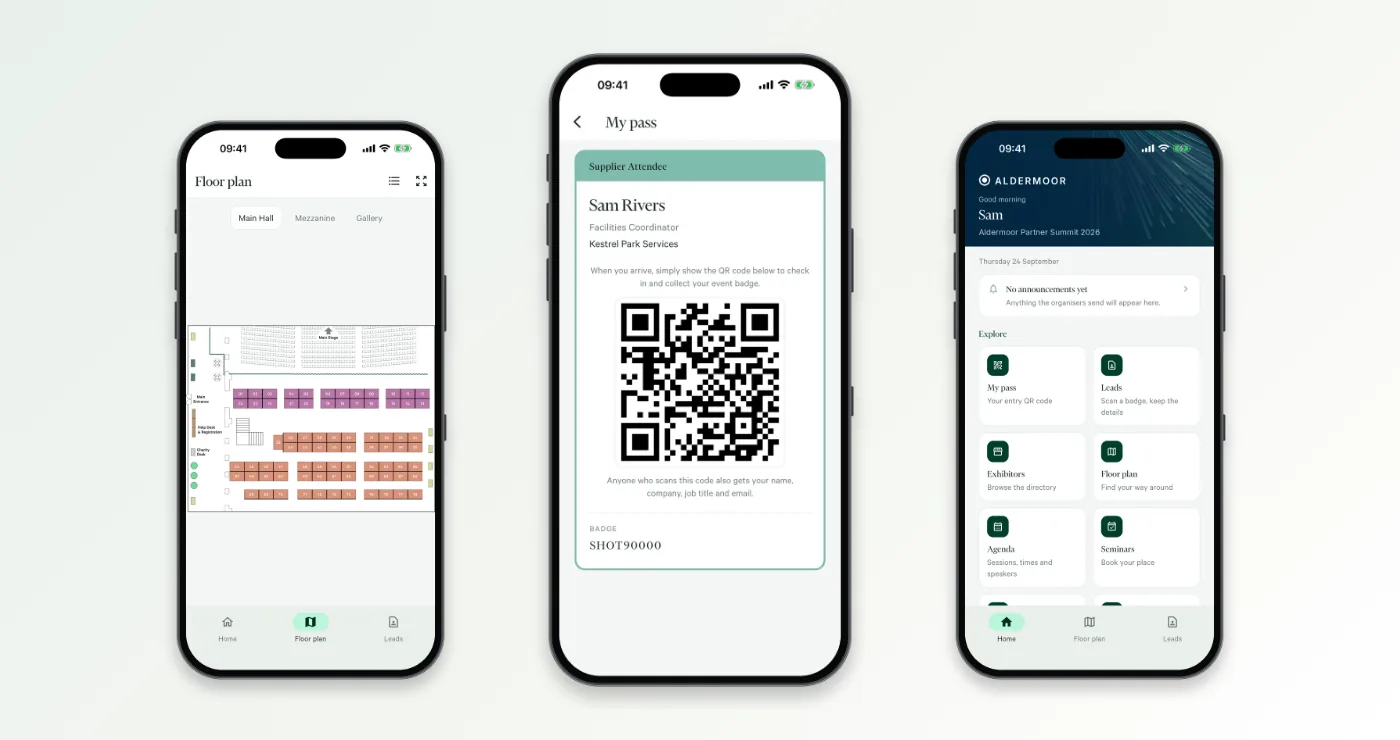
We've been building event technology for over a decade, and making the everyday things easy still takes thought, testing and an understanding of what happens when actual people turn up. There is always something unexpected. The Mitingu attendee app is white-label (your brand, or your client's, not ours) and runs on the same platform as registration, communications and onsite check-in, so there's one set of attendee data from invitation to post-event report. Guests get a QR pass, an interactive floor plan with an exhibitor finder, the agenda and announcements; organisers make last-minute changes themselves through the app CMS rather than waiting on a supplier.
If you'd like to see what that looks like for your event, book a demo and we'll walk through it on a real phone, coffee optional. You can also read more about the attendee app and onsite check-in.